

Instant Notifications - Relevant Information for You
How can you be informed quickly if the water supply is contaminated or if a power outage is planned due to maintenance?
With Instant Notifications on Vangin, you receive relevant information directly on your phone when something happens in your local area.
Notifications delivered directly to your phone
When you receive an Instant Notification on Vangin, a push notification is sent directly from the Vangin app to your phone. You can view it on your screen without opening the app. If you would like more information, you can always sign in to Vangin to read the full message.
Learn more about instant notifications
Below, you can learn more about how instant notifications work on Vangin
Snarboð is a notification service that allows service providers, such as Sev or your municipality, to send you targeted messages if you are affected by a specific event or situation. Instead of searching for information on websites or waiting for announcements on the radio, relevant information is delivered directly to you when it matters.
Service providers send messages directly to you, making Snarboð a useful supplement to information published on websites and broadcast through traditional public announcements.
Service providers, such as municipalities, SEV and other public authorities, send notifications through the Talgildu Føroyar platform.
Notifications can be sent to specific areas, neighbourhoods or groups. This helps ensure that messages are relevant and reach only those who are affected.
You cannot turn off Instant messages if you use Vangin. However, you can choose to disable notifications from the Vangin app, which means you will no longer receive push notifications.
We recommend keeping notifications enabled so that you receive important information as soon as it becomes relevant to you.
No, Instant messages and Mínboks are not the same.
Mínboks is your digital mailbox for formal communication, payslips, tax assessments and other personal documents.
Instant messages are short, timely notifications about events and incidents in your local area.
Talgildu Føroyar is not responsible for the content of Instant messages. The content is managed by the service providers that send the notifications.
Instant messages are not be used for advertising or other marketing purposes.
No, the service is free of charge for all citizens who use Vangin.
If you do not use the Vangin app, you will only receive Instant Notifications on Vangin. You can view them when you sign in.
Instant Notifications on Vangin are a useful supplement to other communication channels. Important information will still be available on websites and through official announcements.
Enable notifications for the Vangin App
To receive push notifications from the Vangin app, you need to enable the app to send notifications. Follow the guide below for your device.
Enable Notifications on iPhone or iPad
Open Settings ⚙️
Go to Apps
Select Vangin
Tap Notifications
Enable Allow Notifications

Select Notifications from the menu

Make sure notifications are enabled as shown in the image
If you have an Android phone or tablet, follow these steps:
Open Settings on your device.
Select Apps.
Scroll down and select Vangin.
Under App Info, select Notifications, then enable Allow Notifications.
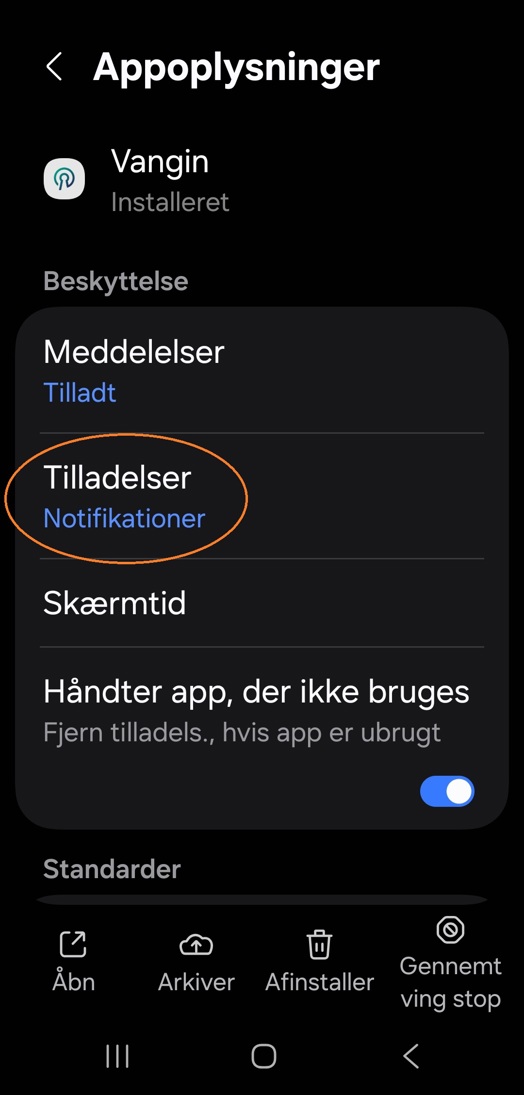

Select Permissions

Select Notifications

